
A streamable HTTP MCP server that gives your AI assistant a unified, searchable knowledge base of Webix snippets, API reference, and SoftCreator Proto-UI extensions — all rewritten to use SC-prefixed view names by default.
Why this exists
Webix 6.4.6 is old enough that LLMs mix it up with newer versions, invent properties, and emit plain
view:"datatable" where SoftCreator codebases require view:"scdatatable".
The Webix MCP server replaces guesswork with lookups against a single, locally-built database.
View names emitted by the AI match what the SoftCreator runtime expects. No manual rename pass after every prompt.
Method signatures, allowed values, and event names are answered from indexed documentation rather than guessed.
Looking up ui.datatable automatically surfaces scdatatable: its mixins, defaults, and custom methods.
How it works
The build pipeline harvests, parses, and normalizes four independent sources into one SQLite database. The runtime server exposes that database to any MCP-compatible client over streamable HTTP.
Architecture overview — four sources merge into one searchable knowledge base.
What's inside
| Source | Coverage | Records |
|---|---|---|
| Webix snippets | All public snippets, post-processed with SC view names | 1,447 |
| Webix documentation | Full API reference + guides (v6.4.6) | 17,020 pages |
| SoftCreator Proto-UI | All webix.protoUI(...) extensions and mixins |
59 extensions |
| SoftCreator UI pages | Full production-page Webix configs with semantic analyses | 377 pages |
| SC component patterns | Deduplicated canonical sub-trees with back-references | 4,237 patterns |
| SC control properties | Per-control property schemas harvested from property editors | 96 controls |
| Database | SQLite + FTS5 indexes | ~88 MB |
Under the hood
Switch between flow, sequence, schema, and timeline to see how requests travel, what's stored, and how the project evolved.
Request flow — what happens when a developer types a prompt.
Sequence — typical two-call interaction for a real prompt.
Schema — tables and relationships only. Field-level details live in docs/SCHEMA.md.
Evolution — four phases from proof of concept to production.
SoftCreator-first mapping
Every Webix snippet that uses a control with a SC wrapper is post-processed so that
view:"datatable" becomes view:"scdatatable", and so on. The mapping is
deterministic and applied only at well-known syntactic positions.
Mapping flow — applied once at build time; the runtime database holds the SC-shaped result.
Specialized SC controls — scwizard, codeeditor, bpmneditor,
sctimeline, erddesigner and others — remain in the catalog as first-class
extensions but are excluded from the autoreplace map. Webix views without a SC wrapper
(gantt, spreadsheet, kanban, pivot,
scheduler) pass through unchanged.
MCP surface
Every tool returns JSON with a source field of 'webix' or 'sc',
so the AI can correctly attribute every citation it produces.
Get started
Follow the tabs in order. Paste your mcp_user token once on step 2 and the
mcp.json snippet on step 3 will be filled in automatically. The token is kept only in
your browser tab's sessionStorage — it is never sent to the server.
mcp_user API key from your administrator
The MCP server uses Bearer-token authentication. Tokens are issued by the
webix-mcp operator via the LAN-only admin endpoint on port 12041
— regular users cannot self-issue keys. Reach out to the operator
who installed the server and ask them to provision a key for you.
webix-mcp
to your organization — typically your team's DevOps engineer or whoever maintains
the SoftCreator infrastructure. If you don't know, ask in your team's Slack / Teams
channel for "the owner of webix.mcp.softcreator.com".
Suggested message to send
Hi,

Could you please provision an mcp_user API key for me on
the webix-mcp server (webix.mcp.softcreator.com)? I'd like to wire it
into Cursor so the agent can search the Webix / SoftCreator knowledge
base.

Suggested key name:   <your-name>@<your-machine>     (e.g. alice@laptop)
Role I need:          mcp_user
Where I'll use it:    Cursor on my workstation

Thanks!
The administrator will send you back a single string — the plaintext_key.
It is shown only once on their side and cannot be retrieved later, so save it somewhere
safe (password manager) before pasting it into step 2.
Replace <your-admin-key>, <server-lan-ip>, and the
name with the requester's identifier. The endpoint requires an
admin-role key (the bootstrap admin key is printed once during the
infra/deploy/install.sh run — see Builder/INSTALL.md).
$AdminToken = "<your-admin-key>"
$Body       = @{ name = "alice@laptop"; role = "mcp_user" } | ConvertTo-Json
Invoke-RestMethod `
    -Uri     "http://<server-lan-ip>:12041/admin/api-keys" `
    -Method  Post `
    -Headers @{ Authorization = "Bearer $AdminToken" } `
    -ContentType "application/json" `
-Body $BodyADMIN_TOKEN="<your-admin-key>"
curl -sS -X POST http://<server-lan-ip>:12041/admin/api-keys \
-H "Authorization: Bearer $ADMIN_TOKEN" \
-H "Content-Type: application/json" \
-d '{"name":"alice@laptop","role":"mcp_user"}'
The response includes a plaintext_key field. Copy it and pass it back
to the requester over a secure channel.
mcp_user token here
The token is stored only in this browser tab's sessionStorage. It is injected
into the mcp.json snippet on step 3 in the browser — nothing is sent over
the network.
No token set — step 3 will show a <paste-the-mcp_user-key-from-step-1> placeholder.
sessionStorage is scoped to this tab only,
cleared when you close it, and isolated from other origins. The token never leaves your
browser — the server hosting this page does not log it.
webix entry to Cursor's mcp.jsonCursor reads MCP server registrations from one of two locations — the project-level file wins when both exist. Use the global file unless you want webix-mcp visible in only one project.
| Scope | Windows | macOS / Linux |
|---|---|---|
| Global | %USERPROFILE%\.cursor\mcp.json |
~/.cursor/mcp.json |
| Per-project | <project>\.cursor\mcp.json |
<project>/.cursor/mcp.json |
If mcp.json does not exist yet, save the file below as-is. If it already
contains other MCP servers, merge the webix entry into the existing
mcpServers object — do not overwrite the file.
mcp.json — with your token already injected<paste-the-mcp_user-key-from-step-1> placeholder. Go back to
step 2 and paste your token, or hand-edit the file
after downloading.
PowerShell — create the directory if missing and open the file
New-Item -ItemType Directory -Force -Path "$env:USERPROFILE\.cursor" | Out-Null
notepad "$env:USERPROFILE\.cursor\mcp.json"
bash — same on macOS / Linux
mkdir -p ~/.cursor
$EDITOR ~/.cursor/mcp.json   # or: nano ~/.cursor/mcp.json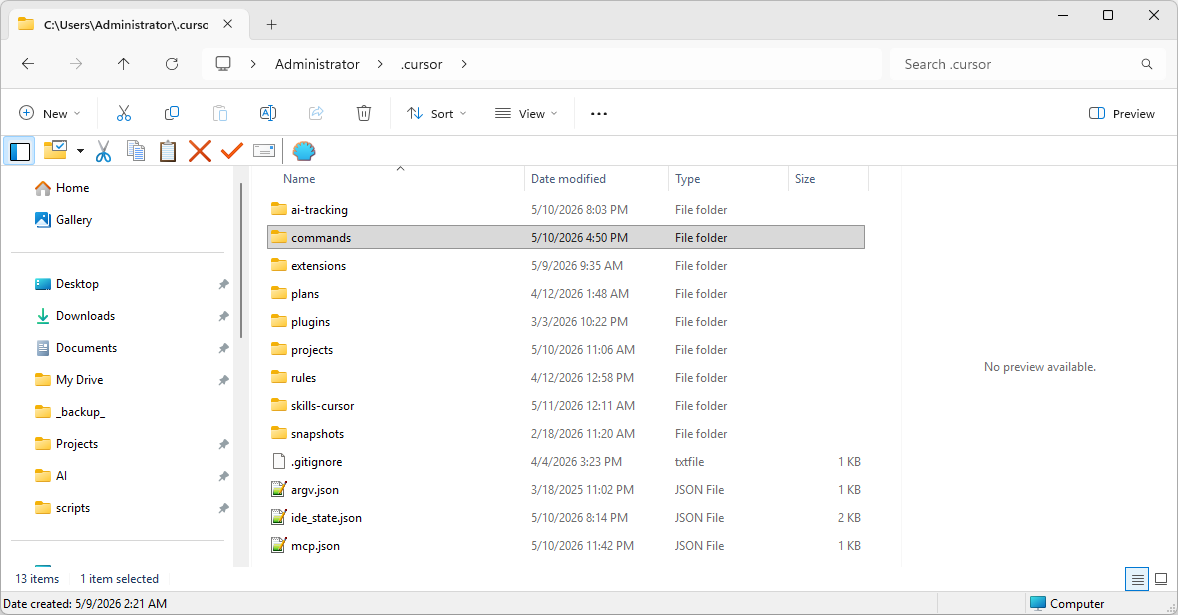
%USERPROFILE%\.cursor\. The mcp.json file
sits at the bottom of the listing; the commands\ subfolder is where
step 5 will install webix.md.
Cursor only loads MCP servers at startup. A window reload (Ctrl+Shift+P → Reload Window)
is not enough for new server registrations — do a full
File → Exit, then reopen Cursor.
It is not in the VS Code-style settings (Ctrl+,) —
those are just the inherited editor settings. MCP servers are managed in the separate
Cursor Settings window. Open it via any of:
Ctrl+Shift+P → type Cursor Settings → pick Cursor Settings: Open Cursor Settings.Ctrl+Shift+J.Inside Cursor Settings, click Tools & MCPs in the left sidebar (under the Plugins group). Older builds may name it MCP, MCP & Integrations, or expose it under Features → Model Context Protocol.
webix.search_webix_snippets, get_snippet, list_webix_tags, list_webix_components, search_webix_docs, get_doc_page, list_webix_owners, get_webix_api_reference), three Proto-UI tools (search_softcreator_extensions, get_softcreator_extension, list_softcreator_extensions), and eight SC-pages tools (search_softcreator_pages, get_softcreator_page, list_softcreator_pages, search_page_components, get_page_component, get_control_properties, list_control_types, search_control_properties).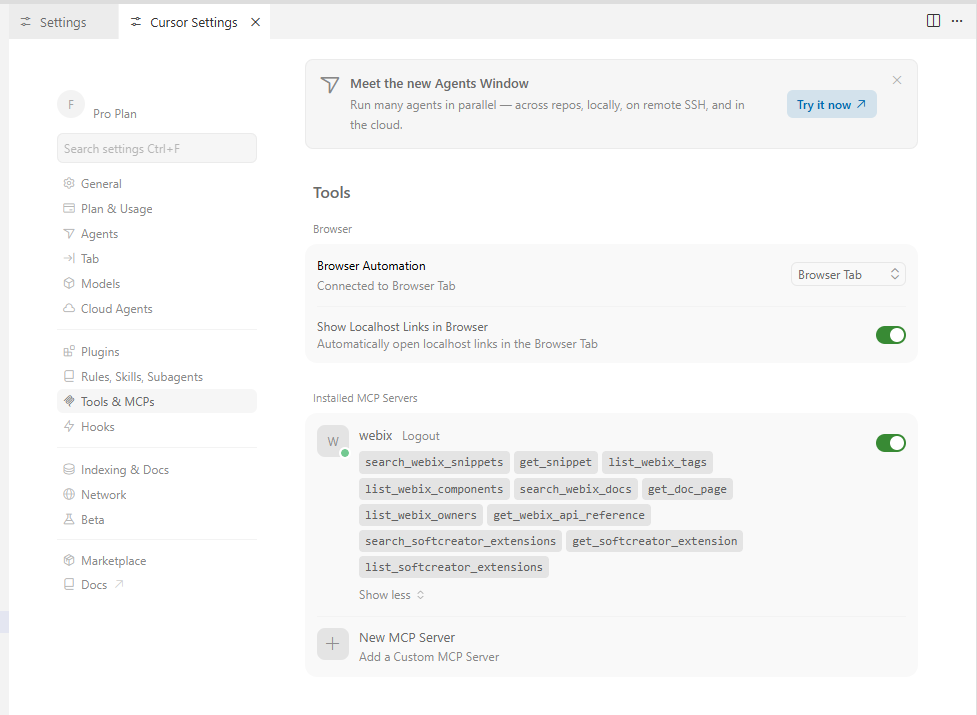
webix
entry shows a green dot, the toggle is on, and clicking it expands the full list
of 19 tools.
Click Show Output next to the entry — the line that matters is the one above the OAuth-fallback noise. Match it against this table:
| Output snippet | What it means | Fix |
|---|---|---|
HTTP 401 … Invalid or disabled API key |
Server reached, but your token is not in its auth.db (or was revoked). |
Ask the administrator to confirm the key (or reissue), then re-run step 2. |
HTTP 403 |
Token valid, but the role is not mcp_user / admin. |
Ask the administrator to reissue with the correct role. |
ENOTFOUND / ECONNREFUSED / ETIMEDOUT |
DNS/routing issue — the Cursor host cannot reach webix.mcp.softcreator.com. |
Check VPN, corporate proxy, and that pfSense is forwarding the hostname. |
HTTP 404 on the MCP URL itself |
URL typo — missing /mcp/, wrong scheme, or extra path segment. |
Verify mcp.json matches the snippet on step 3 byte-for-byte. |
OAuth fallback / 404 on .well-known/oauth-* |
Cosmetic noise after a 401 — this server does not advertise OAuth. | Ignore; fix the line above it. |
/webix slash command (recommended)
The slash command primes the agent with SoftCreator-specific guidance: the SC ↔ Webix
name mapping, search strategy, and citation rules. Without it, the agent still has access
to all 11 MCP tools — but it will not know to translate scdatatable
↔ ui.datatable, or to cite snippet URLs.
| Scope | Windows | macOS / Linux |
|---|---|---|
| Global | %USERPROFILE%\.cursor\commands\webix.md |
~/.cursor/commands/webix.md |
| Per-project | <project>\.cursor\commands\webix.md |
<project>/.cursor/commands/webix.md |
Save the file below as webix.md in the commands directory. No
token is needed — the slash command is a pure prompt.
---
description: Find and adapt a SoftCreator/Webix snippet from the local knowledge base
---

You are working inside a SoftCreator project. SoftCreator extends Webix UI controls via Proto-UI; the canonical control names in this codebase are SC-prefixed: `scdatatable`, `scform`, `sclayout`, `sctree`, `sctreetable`, `sctext`, `scbutton`, etc.

You have access to the `webix-snippets` MCP server with nineteen tools spanning four domains.

**Webix snippets (post-processed: SC names applied where a wrapper exists):**
- `search_webix_snippets(query, tag, component, limit)` — full-text search. Use SC component names in the `component` filter (e.g. `component="scdatatable"`).
- `get_snippet(url)` — full JS+HTML by short URL id.
- `list_webix_tags(filter)` / `list_webix_components(filter, min_freq)` — discovery.

**Webix documentation (full local mirror of docs.webix.com):**
- `search_webix_docs(query, kind, owner, member_kind, limit)` — `owner` uses base Webix names (e.g. `ui.datatable`, NOT `scdatatable`).
- `get_doc_page(file_name)`, `list_webix_owners(...)`, `get_webix_api_reference(owner)` — the API reference also lists any SC extension that wraps a given Webix view.

**SoftCreator Proto-UI catalog:**
- `search_softcreator_extensions(query, primary_base, has_mixin, only_standalone, limit)` — search the SC catalog (35 wrappers + 24 standalone controls including codeeditor, bpmneditor, sctimeline).
- `get_softcreator_extension(name)` — full members, defaults, mixins, source code.
- `list_softcreator_extensions(filter, base_filter, only_standalone)` — discovery.

**SoftCreator UI pages (377 production pages, 4 237 deduplicated sub-tree patterns, 96 control-property schemas):**
- `search_softcreator_pages(query, domain_module, ui_pattern, primary_entity, feature, limit)` — full-text search. Each page carries a semantic analysis (purpose, primary entity, operations, features, UI pattern). Use this when the user wants a complete page composition to clone.
- `get_softcreator_page(page_id, include_config)` — full Webix UI config + analysis. Set `include_config=false` for metadata only; `true` (default) for the cloneable config.
- `list_softcreator_pages(domain_module, ui_pattern, primary_entity, name_filter, ...)` — directory by module / pattern / entity.
- `search_page_components(root_view, level, min_count, limit)` — find canonical sub-tree patterns. Each carries a count, n_distinct_pages, and a canonical example to copy.
- `get_page_component(fingerprint)` — canonical example + back-references to every page that shares the same shape.
- `get_control_properties(element_id)` — full property schema (name/label/view/tab/required/hidden) for one SC control type.
- `list_control_types(min_fields)` — enumerate the 96 harvested control types.
- `search_control_properties(query, view, required, limit)` — which controls expose a given property name or label.

**Workflow:**

1. Decide what the user needs:
   - **A complete page composition to clone** (e.g. "build a grid+form for entity X like in module Y") → start with `search_softcreator_pages`. Then `get_softcreator_page(...,include_config=true)` for the 1–2 best matches and adapt.
   - **A standalone sub-tree pattern** (e.g. "I want the standard SC Save button", "give me the canonical accordion+treetable") → `search_page_components` with the relevant `root_view`. Then `get_page_component(fingerprint)` for the canonical example and source references.
   - **A working code example for a single concept** → `search_webix_snippets`. The returned JS already uses SC names where applicable.
   - **The exact API of a Webix view** → `search_webix_docs` or `get_webix_api_reference(owner='ui.<name>')`. Docs use base Webix names.
   - **A SC-specific control or property** (Proto-UI defaults, mixins, custom methods) → `search_softcreator_extensions` / `get_softcreator_extension`. For property discovery, also `search_control_properties` (which controls accept gravity / minWidth / scroll / …).

2. When the user names a control in SC form (`scdatatable`, `sctree`, etc.) or in Webix form, translate:
   - For snippet/component search: pass the SC name as `component` / `root_view`.
   - For doc search: strip the `sc` prefix and pass `owner='ui.<base>'`.
   - For SC catalog and pages: pass the SC name directly.

3. For non-trivial requests, combine sources: page-level retrieval for the overall composition, snippets and component patterns for sub-trees, docs/extensions for property-level verification. Verify any unusual property against the docs (Webix base) AND the SC defaults (DataSourceID, optionsDataSource, linkedParentPageElementID, etc.) AND the harvested control properties.

4. After ranked results, fetch full content for the 1–2 best matches (`get_softcreator_page`, `get_page_component`, `get_snippet`, `get_doc_page`, `get_softcreator_extension`).

5. Produce a single working code block, in SC style (using SC view names where wrappers exist, Webix names otherwise).
   - Stay within the documented API surface — do not invent properties.
   - Reuse SC defaults when the task involves data binding.

6. After the code block, list your sources:
   - SC pages: `page_id` with module + UI pattern.
   - SC component patterns: `fingerprint` + canonical `page_id`:`path`.
   - Webix snippets: `https://snippet.webix.com/<url>`.
   - Docs: `https://docs.webix.com/<file_name>`.
   - SC extensions: name + primary_base.

7. If nothing relevant is found, say so explicitly and ask for clarification — do not fabricate code from memory.

User task:
$ARGUMENTS
PowerShell — create the directory and download the file in one go
New-Item -ItemType Directory -Force -Path "$env:USERPROFILE\.cursor\commands" | Out-Null
# Save the file from this page using the "Download webix.md" button above,
# then move it into the commands directory:
Move-Item "$HOME\Downloads\webix.md" "$env:USERPROFILE\.cursor\commands\webix.md" -Force
bash — same on macOS / Linux
mkdir -p ~/.cursor/commands
mv ~/Downloads/webix.md ~/.cursor/commands/webix.md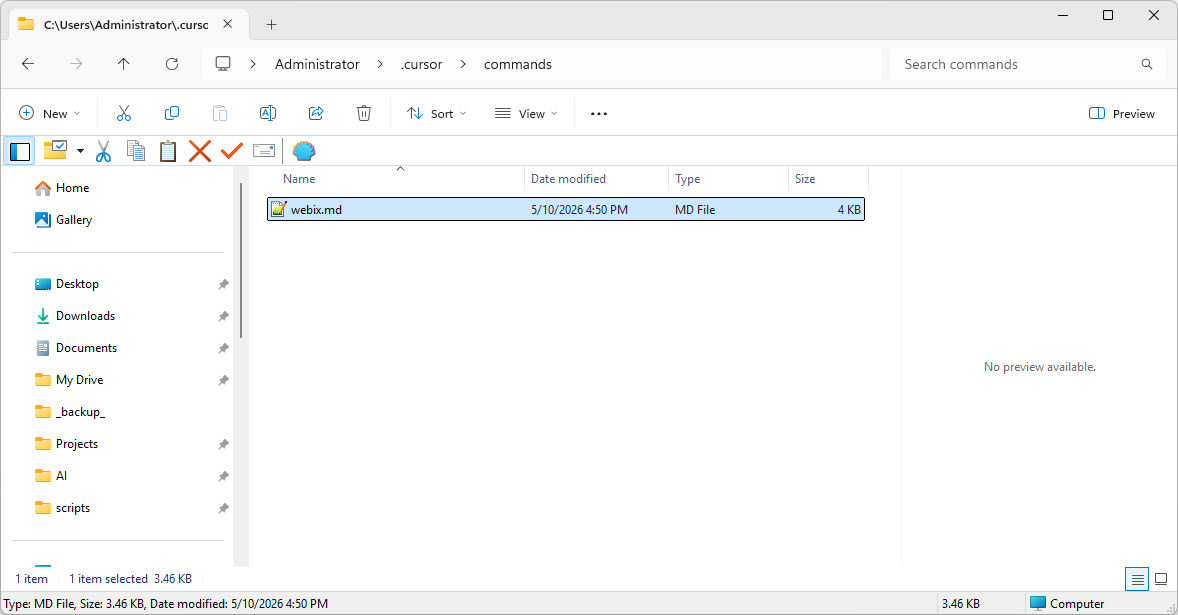
%USERPROFILE%\.cursor\commands\ — just the
single webix.md file. Cursor scans this folder at startup and on
reload to pick up slash commands.
After copying the file, reload the Cursor window: Ctrl+Shift+P →
Developer: Reload Window. A full restart is not required for slash commands.
/webix command in Cursor chat
Open the chat panel with Ctrl+L, switch the dropdown to Agent
(MCP tools are only callable in Agent mode), and type one of the prompts below. The agent
will call search_webix_snippets, search_webix_docs, and
search_softcreator_extensions as needed, then return adapted SC code with
citations to the original sources.
/webix datatable with frozen columns and pagination
/webix scdatatable defaults — what's DataSourceID for?
/webix codeeditor with Monaco — basic config
/webix list all events of ui.kanban
/webix bpmneditor wired into a SoftCreator layout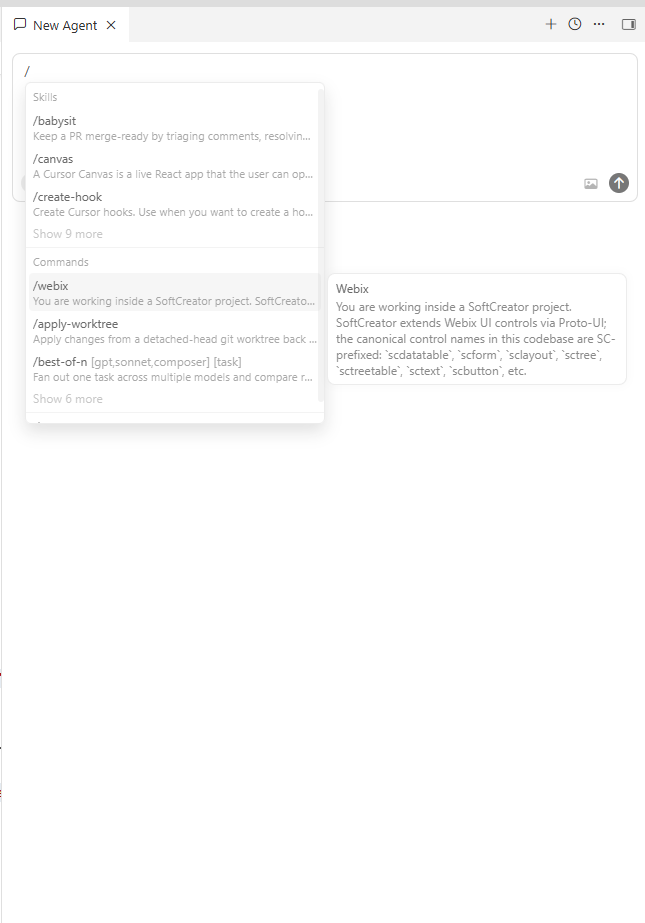
/ to discover slash commands. The /webix entry
appears under Commands; hovering it reveals the prompt it
will inject before your task.
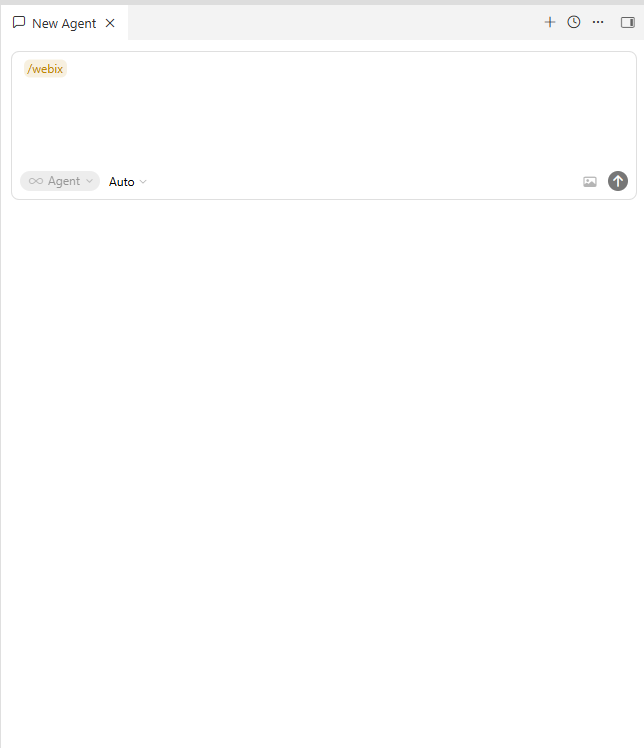
Setup · Anthropic Claude extension in Cursor
/webix from the Anthropic Claude extension too.
The Anthropic Claude extension (Claude Code) runs inside Cursor as a separate AI agent and
does not read Cursor's .cursor/mcp.json. Register the MCP server
once with the Claude Code CLI, drop in the same slash command, and /webix works
identically in the extension's chat.
webix server with claude mcp add
Claude Code stores MCP server registrations separately from Cursor — in
%USERPROFILE%\.claude.json on Windows, ~/.claude.json on
macOS / Linux. The CLI shipped with the extension is the authoritative way to edit it.
| Scope flag | Where it goes | When to use |
|---|---|---|
--scope user |
User config — all projects | Recommended. Mirrors the user-level ~/.cursor/mcp.json setup. |
--scope project |
<project>/.mcp.json (committed) |
Share the registration with the team via git. |
--scope local |
This project only, not in git | Default. One-off experiments. |
Paste the token you obtained in step 1 of the
Cursor setup — the same mcp_user key works for both clients.
PowerShell — one-liner
claude mcp add --transport http --scope user webix `
  https://webix.mcp.softcreator.com/mcp/ `
  --header "Authorization: Bearer <PASTE_YOUR_TOKEN>"
bash — same on macOS / Linux
claude mcp add --transport http --scope user webix \
  https://webix.mcp.softcreator.com/mcp/ \
  --header "Authorization: Bearer <PASTE_YOUR_TOKEN>"
Verify the registration without leaving the terminal:
claude mcp list
Or check from inside the extension — open the chat panel with
Ctrl+Esc, type /mcp, and pick MCP servers
from the autocomplete. The popup that opens lists webix under
User with a green Connected badge.
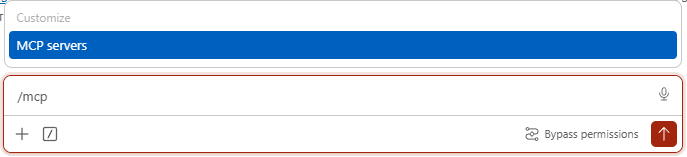
/mcp in the chat input. The Customize
popup surfaces MCP servers as the matching slash action.
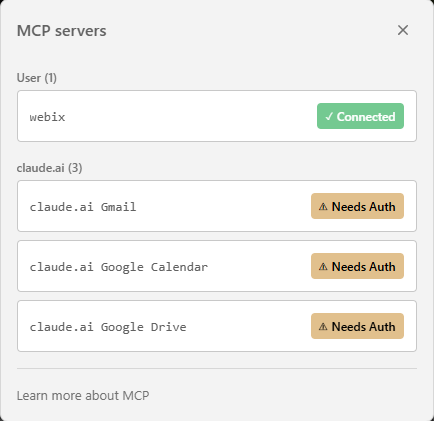
webix appears under
User (1) with Connected — the
claude.ai entries below are unrelated managed connectors.
Ctrl+Esc.
webix.md into Claude Code's commands folderClaude Code supports custom slash commands as plain Markdown files with YAML frontmatter — the exact same format Cursor uses. The file you saved in step 5 of the Cursor setup works unchanged; you just need a copy in Claude Code's commands directory.
| Scope | Windows | macOS / Linux |
|---|---|---|
| Global | %USERPROFILE%\.claude\commands\webix.md |
~/.claude/commands/webix.md |
| Per-project | <project>\.claude\commands\webix.md |
<project>/.claude/commands/webix.md |
Easiest path: copy the file you already saved for Cursor.
PowerShell
New-Item -ItemType Directory -Force -Path "$env:USERPROFILE\.claude\commands" | Out-Null
Copy-Item "$env:USERPROFILE\.cursor\commands\webix.md" `
          "$env:USERPROFILE\.claude\commands\webix.md" -Force
bash — same on macOS / Linux
mkdir -p ~/.claude/commands
cp ~/.cursor/commands/webix.md ~/.claude/commands/webix.md
If you skipped the Cursor setup, grab the file from step 5 above — the body of the prompt is identical for both clients.
/webix in the Claude Code chat
Open the extension panel (Ctrl+Esc in Cursor), then type
/webix followed by your question. Claude Code injects the prompt body,
calls the webix MCP server's tools, and returns SC-shaped code with
citations — the same workflow as Cursor's native agent.
/webix datatable with frozen columns and pagination
/webix scdatatable defaults — what's DataSourceID for?
/webix codeeditor with Monaco — basic config
To inspect MCP state from inside the chat, type the built-in command:
/mcp
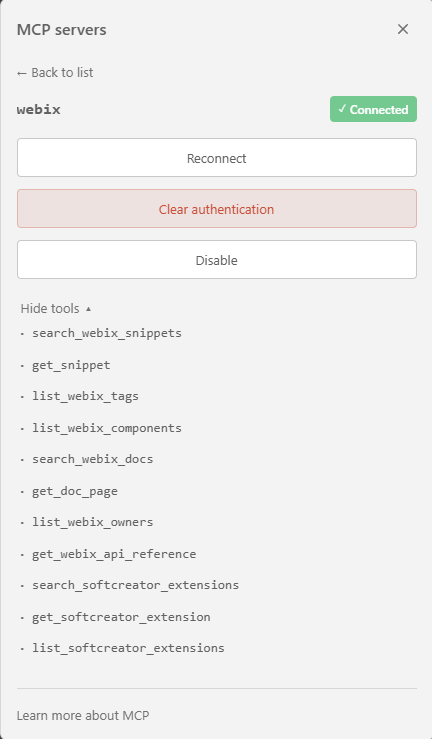
It lists every connected server and the tools it exposes. Click the webix
row to drill into its detail card — Reconnect,
Clear authentication, Disable, and
View tools. Expanding the tool list reveals the same nineteen tools
the Cursor agent has access to.
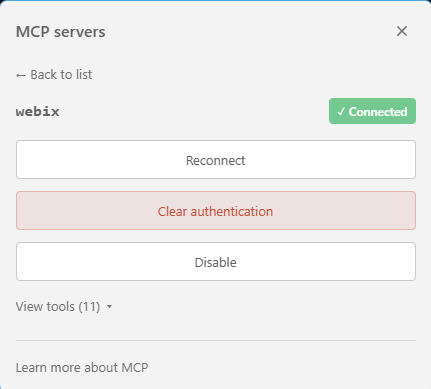
webix detail card. The View tools
counter confirms the server registered every tool exposed by the runtime.
/webix prompt orchestrates.
Repository
The build pipeline and the runtime server are deployed independently. The original prototype is preserved as a historical reference.
FastAPI + MCP streamable HTTP server. Read-only access to the SQLite knowledge base. Nineteen tools, OpenAPI 3.1, health endpoint.
Harvests, parses, classifies, transforms, and publishes the knowledge base. Resumable. Runs on demand.
Original 20-snippet proof of concept with two MCP tools. Frozen for historical reference.